Navigating subscriptions can feel like another boss battle for busy US gamers who are balancing careers families and their precious gaming time Understanding how to cancel subscription on Roblox is key to managing your digital spending and ensuring you only pay for what you truly use This comprehensive guide provides clear actionable steps to help you manage your Roblox Premium membership with ease whether you are playing on PC or mobile With many adult gamers averaging over 10 hours a week in games and often engaging in social cross-play across devices knowing how to efficiently handle subscriptions ensures you maintain control over your entertainment budget and free up resources for new gaming experiences or even hardware upgrades This month many players are looking for ways to optimize their gaming habits and this guide is designed to empower you with the knowledge to do just that.
What is Roblox Premium and why might I want to cancel it?
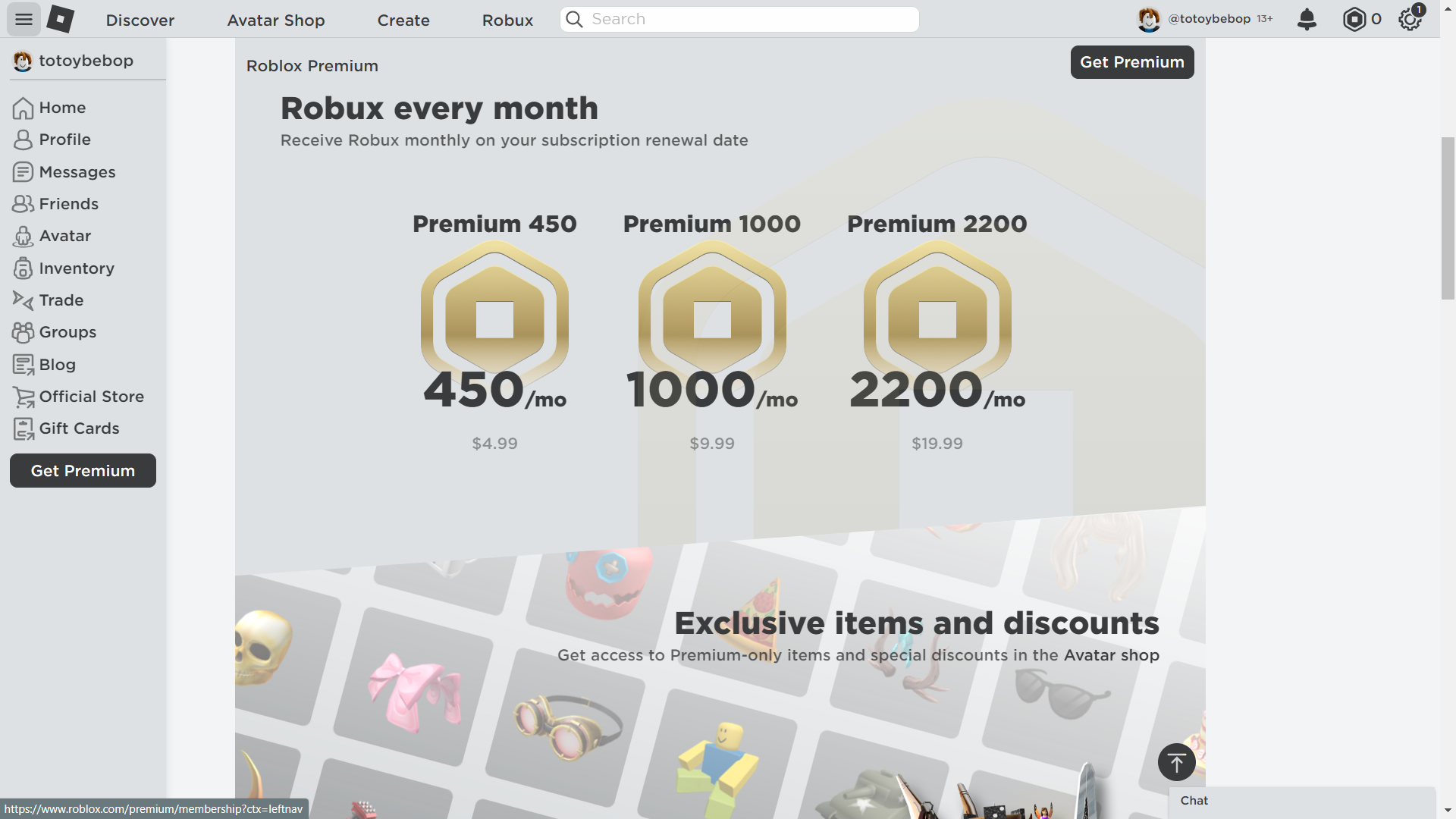
Roblox Premium is a monthly subscription offering Robux stipends a 10 percent bonus on Robux purchases and exclusive items. Gamers often cancel due to changing interests reduced playtime financial adjustments or shifting focus to other gaming platforms. Its about optimizing your gaming budget and ensuring every dollar spent enhances your experience.
How do I cancel my Roblox Premium subscription on a computer?
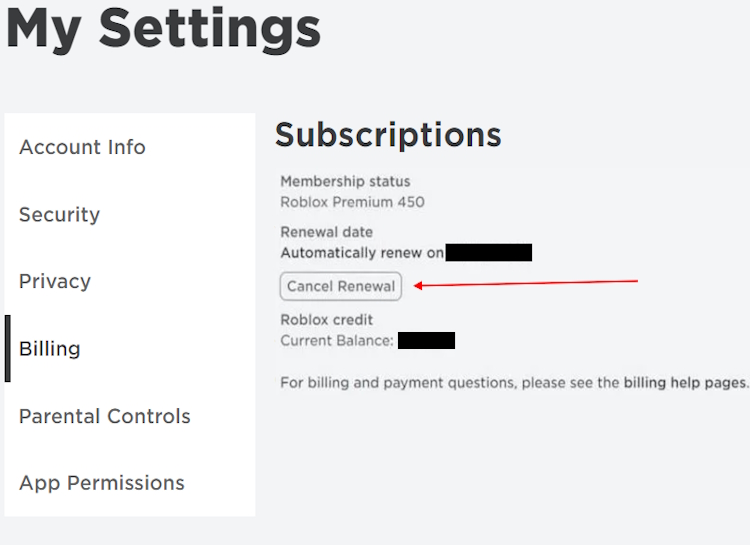
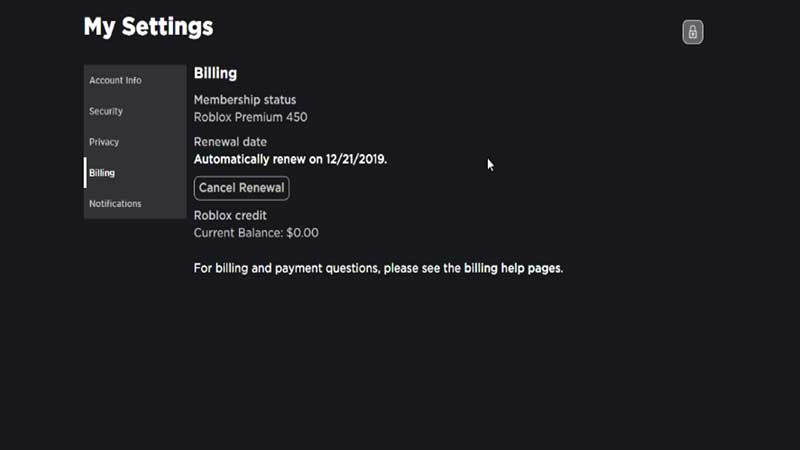
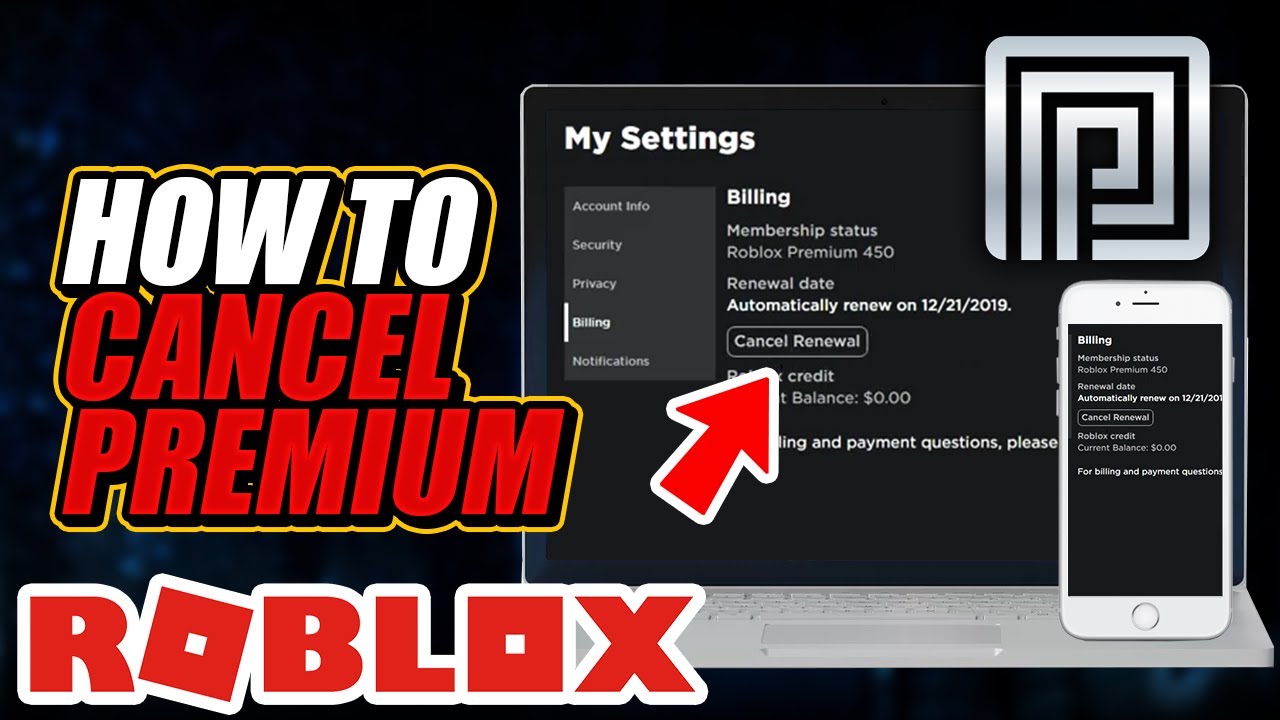
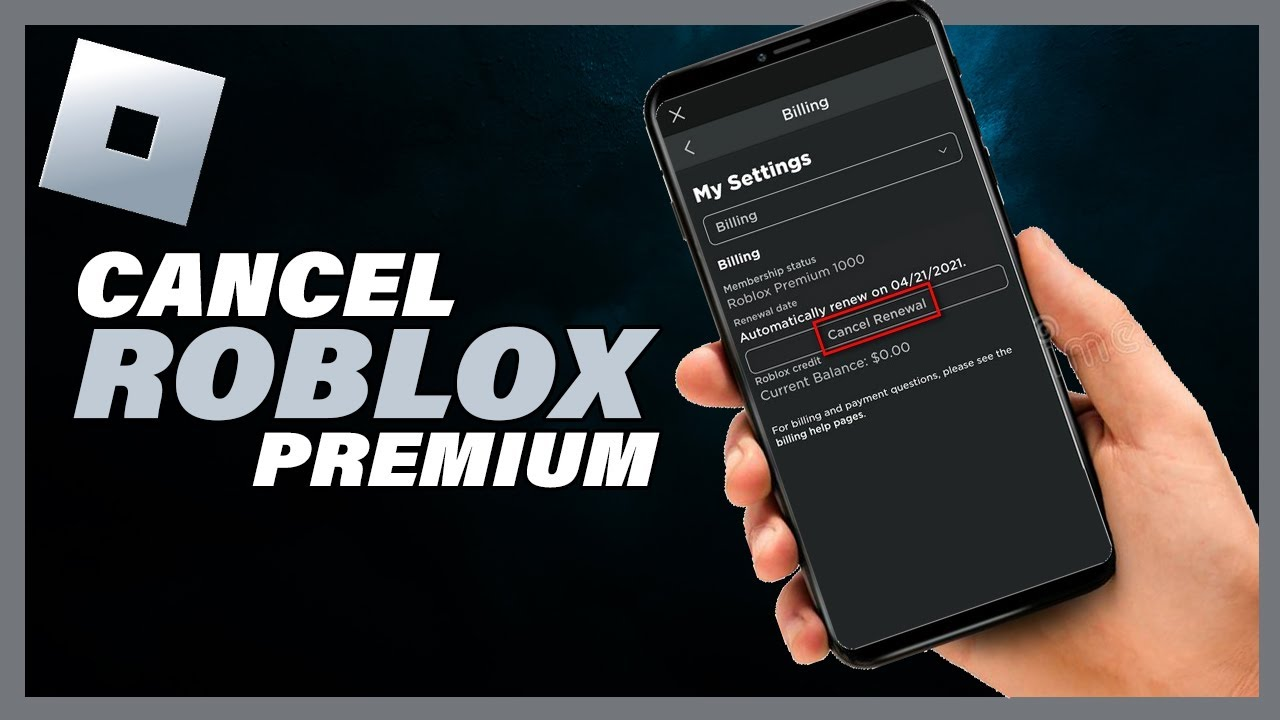
To cancel on a computer log into your Roblox account on the official website. Click the gear icon for 'Settings' then navigate to 'Billing'. Locate your Premium subscription and click 'Cancel Renewal'. Follow the on-screen prompts to confirm. Your benefits will continue until the current billing cycle ends.
What are the steps to cancel Roblox Premium via my iPhone or Android device?
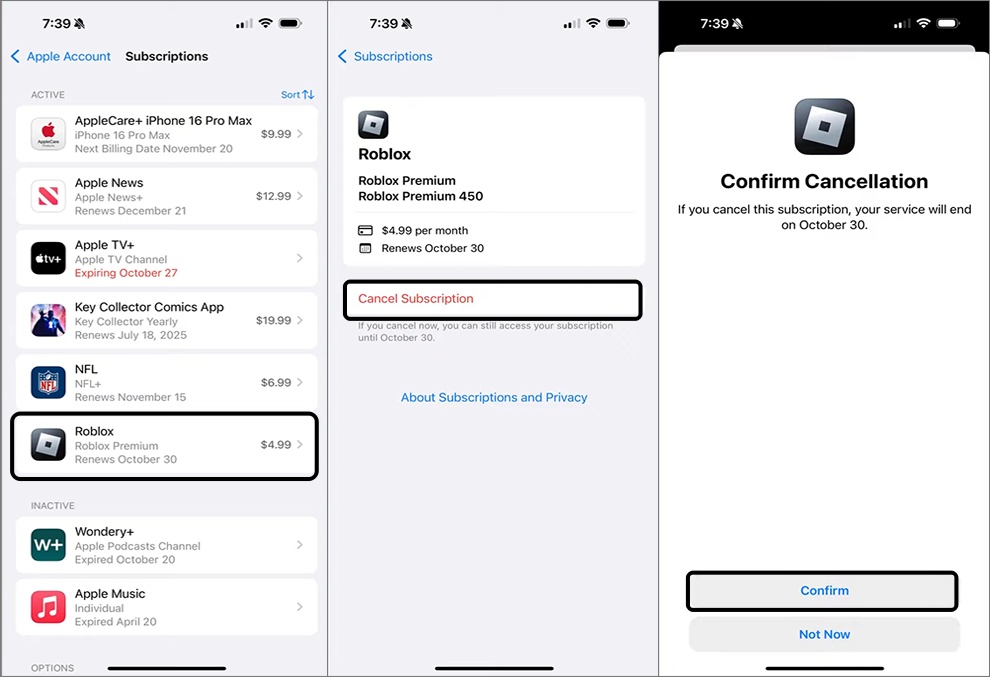
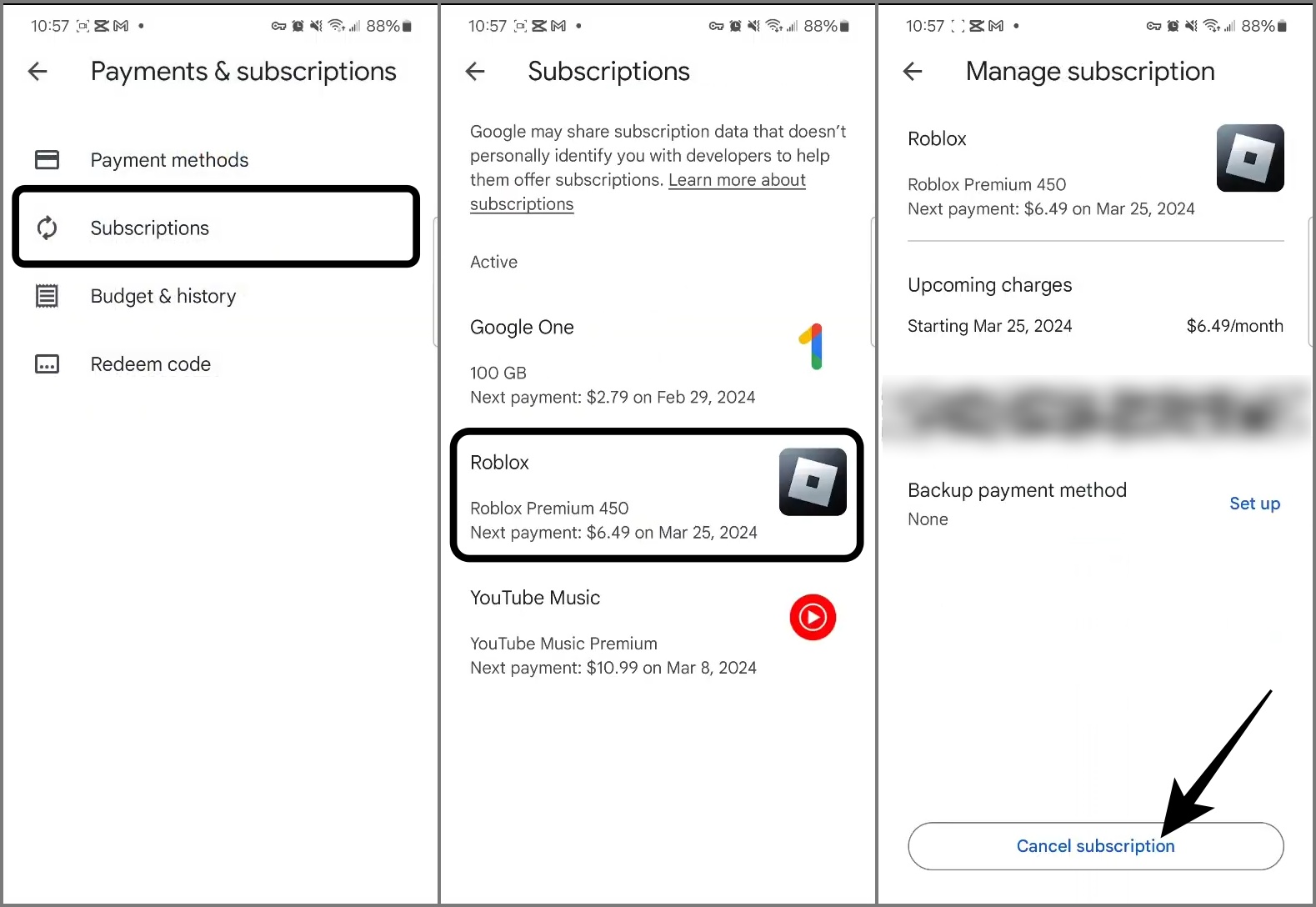
For iOS go to Settings tap your name then 'Subscriptions' find Roblox and tap 'Cancel Subscription'. On Android open the Google Play Store tap your profile icon then 'Payments & subscriptions' then 'Subscriptions' find Roblox and tap 'Cancel subscription'. This manages the subscription through the app store.
Will I lose my Robux or game items if I cancel my Roblox Premium membership?
No you will not lose any Robux you have already received or purchased nor will your existing game items and progress be affected. Any Robux currently in your account remain yours to spend. You will only stop receiving future monthly Robux stipends and the purchase bonus after your current subscription period expires.
Can I get a refund for a partial month if I cancel Roblox Premium early?
Roblox generally does not offer refunds for partial subscription periods. When you cancel your subscription it simply ensures that your membership will not automatically renew. You will continue to enjoy all Premium benefits for the remainder of the period you have already paid for until its natural expiration date.
What if I subscribed to Roblox Premium through a third-party platform like Xbox or Amazon?
If you subscribed via a third-party like Xbox or Amazon you must cancel through that specific platform's subscription management settings. For consoles go to your account's 'Subscriptions' section. For Amazon go to 'Your Memberships and Subscriptions' in your Amazon account to manage the Roblox Premium entry.
How can I ensure my Roblox Premium cancellation was successful?
After canceling on the Roblox website or through your app store you should receive a confirmation email. Additionally you can revisit your account's 'Billing' or 'Subscriptions' section to verify that the subscription is marked as 'will not renew' or 'canceled'. This confirms the process was successful and you will not be charged again.
Hey fellow gamers Ever felt like your game time is a precious resource always at odds with adulting responsibilities like work family and those never-ending to-do lists You are not alone In the US the average gamer is around 36 years old and a significant 60 percent balance gaming with a demanding lifestyle We love our games whether it is for relaxation skill-building or connecting with friends but we also value efficiency and smart money management That is where understanding how to cancel subscription on Roblox comes in handy.
Perhaps you have found yourself playing less lately or maybe your priorities have shifted and you are eyeing a new gaming rig or that must-have title you have been saving for Whatever the reason taking control of your recurring subscriptions like Roblox Premium is a practical step every savvy gamer should master Its about ensuring your entertainment budget works for you not against you With 87 percent of US gamers regularly playing and many logging 10 plus hours a week across mobile and PC platforms managing your digital expenses efficiently is more important than ever.
This guide is crafted for you the busy adult gamer who wants clear straightforward answers without the fluff We will walk you through everything you need to know about how to cancel your Roblox Premium subscription providing step-by-step instructions for various platforms and answering all those burning questions you might have By the end of this article you will be empowered to manage your Roblox membership with confidence saving you time and giving you peace of mind so you can get back to what truly matters which is of course more gaming.
Why Would a Gamer Need to Cancel Their Roblox Premium Subscription
Life happens and so do changing gaming habits Many adult gamers find themselves needing to adjust their recurring expenses for various reasons Maybe your gaming time has decreased due to new work projects or family commitments You might be exploring other games or platforms that better fit your current interests With so many amazing free-to-play options and new releases constantly vying for our attention it is natural for priorities to shift.
Financial reasons are also a big factor especially when balancing a household budget Knowing how to cancel subscription on Roblox allows you to reallocate funds to other essentials or perhaps save up for a significant hardware upgrade a new AAA title or even just a well-deserved night out It is about smart financial management and ensuring every dollar spent on gaming truly adds value to your experience. For instance if you are primarily playing social games with friends that do not require Premium benefits canceling can free up funds for a new game pass in a different title.
What Exactly is Roblox Premium and How Does it Work
Roblox Premium is a subscription service offered by Roblox that provides various benefits to its members It enhances the gaming experience by giving you a monthly Robux stipend a virtual currency used to purchase items game passes and access experiences on the platform Premium members also receive a 10 percent bonus on Robux purchases meaning you get more bang for your buck when buying additional Robux beyond your monthly allowance.
Additionally Premium memberships often grant access to exclusive items discounts and trading features within the Roblox ecosystem The subscription typically renews automatically each month or year depending on the plan you chose When you subscribe the payment method linked to your account whether it is a credit card PayPal or an app store account is charged regularly until you decide to cancel. Understanding these mechanics is the first step in knowing how to cancel subscription on Roblox effectively.
How to Cancel Roblox Premium on a Desktop Computer or Browser
For many PC gamers managing subscriptions through a web browser is the most common method This process is straightforward and gives you direct control over your membership. Here are the steps to cancel your Roblox Premium subscription directly from the Roblox website:
Step 1: Log In to Your Roblox Account
- Open your web browser and go to the official Roblox website www.roblox.com.
- Enter your username and password to log into the account that holds the Premium subscription you wish to cancel. Ensure you are logging into the correct account if you manage multiple profiles.
Step 2: Navigate to the Billing Settings
- Once logged in look for the gear icon in the upper right corner of the page. This is the Settings menu. Click on it.
- From the dropdown menu select Settings.
Step 3: Access the Billing Section
- On the Settings page navigate to the left-hand menu.
- Click on the Billing link. This section displays all your subscription and payment information.
Step 4: Cancel Your Premium Membership
- Under the Billing section you should see details about your Roblox Premium subscription.
- Locate the Cancel Renewal button or similar option next to your Premium membership details. Click this button.
Step 5: Confirm Cancellation
- Roblox will likely ask you to confirm your decision or provide a reason for canceling. Follow the on-screen prompts.
- Once confirmed your subscription will be set to not renew at the end of your current billing cycle. You will retain Premium benefits until that date.
You should receive a confirmation email indicating that your subscription cancellation has been processed. Keep this email for your records. This ensures you successfully manage how to cancel subscription on Roblox via your computer.
How to Cancel Roblox Premium Through Mobile Apps (iOS Android)
Mobile gaming dominates a significant portion of the US market with many adult gamers enjoying Roblox on their smartphones and tablets Canceling a subscription initiated through a mobile app store requires going through that specific store's subscription management interface rather than directly through Roblox Here is how to do it for both iOS and Android devices:
Canceling on iOS (iPhone iPad)
If you subscribed to Roblox Premium through the Apple App Store follow these steps:
Step 1: Open Settings
- Tap the Settings app on your iPhone or iPad.
Step 2: Access Apple ID
- Tap on your name at the very top of the Settings menu.
Step 3: Go to Subscriptions
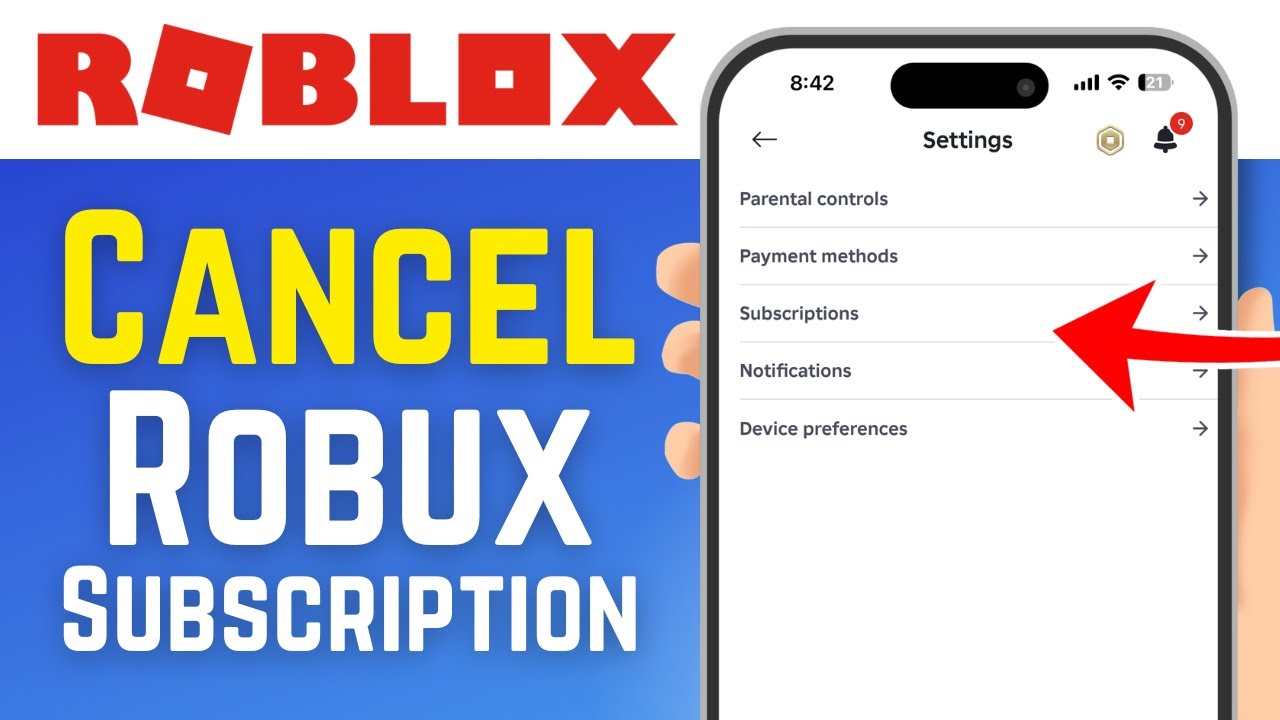
- Tap Subscriptions. You might be asked to sign in with your Apple ID.
Step 4: Locate Roblox
- Find Roblox Premium in your list of active subscriptions and tap on it.
Step 5: Cancel Subscription
- Tap Cancel Subscription. If you do not see a Cancel Subscription button then the subscription is already canceled and will not renew.
Your Roblox Premium will remain active until the end of the current billing period.
Canceling on Android
For those who subscribed via the Google Play Store on an Android device here is the process:
Step 1: Open Google Play Store
- Open the Google Play Store app on your Android phone or tablet.
Step 2: Access Menu
- Tap your profile icon in the top right corner.
Step 3: Go to Payments & Subscriptions
- Tap Payments & subscriptions then Subscriptions.
Step 4: Locate Roblox
- Find Roblox in the list and tap on it.
Step 5: Cancel Subscription
- Tap Cancel subscription. Follow the on-screen instructions to confirm.
Just like with iOS your Premium benefits will continue until the current billing cycle ends. Knowing these mobile-specific steps is crucial for understanding how to cancel subscription on Roblox from anywhere.
What Happens to My Robux and Benefits After I Cancel Roblox Premium
This is a common concern for many players who want to ensure they do not lose out on their hard-earned or purchased virtual currency when they decide to cancel their Premium membership. The good news is that canceling Roblox Premium does not immediately strip you of everything you have accumulated.
Any Robux you have already received from your monthly stipend or purchased with the Premium bonus will remain in your account You can continue to spend these Robux on items game passes and experiences within Roblox without any issues Your existing inventory of items and game progress will also be unaffected. The primary change is that you will no longer receive the monthly Robux stipend the 10 percent Robux purchase bonus or access to Premium-exclusive items or trading features once your current billing cycle concludes. Essentially you get to keep and use what you have already gained from your Premium status up until its expiration date.
Will I Get a Refund if I Cancel My Roblox Premium Membership
Generally Roblox does not offer refunds for partial subscription periods when you cancel Premium When you cancel your subscription it simply means that your membership will not automatically renew for the next billing cycle However you will continue to enjoy all the Premium benefits for the remainder of the period you have already paid for.
For example if you pay monthly on the 10th and cancel on the 15th you will still have Premium access until the 9th of the following month. Roblox policy typically states that all Premium subscription sales are final and non-refundable This aligns with industry standards for digital subscriptions. Always check the specific terms and conditions or the Roblox support page for the most up-to-date refund policy especially if you believe there was an error in billing. This information is key when considering how to cancel subscription on Roblox and its financial implications.
Can I Reactivate My Roblox Premium Subscription Later If I Change My Mind
Absolutely Many gamers find their schedules or interests shift and they might want to rejoin the Premium club at a later date Roblox makes it easy to resubscribe. If you decide that the Premium benefits like the monthly Robux stipend or exclusive access are something you miss you can always reactivate your membership.
To do so simply log into your Roblox account navigate back to the Billing section in your Settings and you should see an option to purchase or renew your Premium subscription. The process is similar to how you initially subscribed You can choose your preferred plan and payment method and your Premium benefits will resume immediately upon successful payment. This flexibility is great for adult gamers who need to adapt their spending and gaming habits to their busy lives. Knowing you can easily come back makes the decision to cancel less permanent and more about temporary budget management.
What If I Subscribed to Roblox Premium Through a Third-Party Platform Like Amazon or Xbox
Roblox is a vast platform and many players access it and its Premium benefits through various third-party channels If you did not subscribe directly through the Roblox website or standard mobile app stores the cancellation process will be slightly different You will need to manage your subscription through the platform where you originally made the purchase.
Xbox PlayStation or Nintendo Switch: For console subscriptions you typically manage these directly through your console's account settings. Go to the Subscriptions or Services section in your Xbox PlayStation or Nintendo account dashboard. Find the Roblox Premium subscription and follow the prompts to cancel its automatic renewal.
Amazon Appstore: If you subscribed via an Amazon device like a Kindle Fire you would go to your Amazon account's 'Your Memberships and Subscriptions' page. Locate Roblox Premium and select the option to manage or cancel.
Other Retailers or Gift Cards: If your subscription was activated using a gift card or a code purchased from a retailer it might be a one-time purchase that does not auto-renew. If it does you would generally follow the instructions provided by that specific retailer or the terms associated with the gift card.
Always remember to go back to the source of your original purchase for managing these types of subscriptions. This is a crucial distinction when learning how to cancel subscription on Roblox from various entry points.
Tips for Managing Your Roblox Subscriptions Effectively
As busy adult gamers we are all about efficiency and smart decisions Here are some tips to help you stay on top of your Roblox subscriptions and other gaming expenses:
- Set Calendar Reminders: If you are prone to forgetting renewal dates add a reminder to your digital calendar a few days before your subscription is due This gives you time to decide if you want to continue or cancel.
- Review Bank Statements Regularly: Periodically check your bank or credit card statements for unexpected recurring charges. This helps you catch any subscriptions you might have forgotten about.
- Utilize Account Settings: Make it a habit to visit the 'Billing' or 'Subscriptions' sections of your gaming accounts every few months to see what is active.
- Consider One-Time Robux Purchases: If you only occasionally need Robux for a specific item or game pass consider buying Robux directly instead of a Premium subscription to avoid recurring charges.
- Educate Family Members: If younger family members use your account ensure they understand the implications of making purchases or starting subscriptions.
By adopting these practices you will maintain better control over your gaming budget and ensure that your entertainment spending aligns with your current priorities and financial goals which is a smart move for any dedicated gamer in 2026.
Taking control of your gaming subscriptions like knowing how to cancel subscription on Roblox is a valuable skill for any busy adult gamer in todays fast-paced world It empowers you to manage your finances more effectively and align your gaming habits with your life goals We have covered everything from the step-by-step cancellation process on various platforms to understanding what happens to your Robux and the nuances of third-party subscriptions.
Remember flexibility is key and Roblox makes it easy to step away and return whenever suits your schedule and budget best This month as gamers continue to seek balance and value for money in their entertainment choices being informed about subscription management puts you in the driver's seat Now that you are equipped with this knowledge you can game smarter not just harder.
What is your biggest gaming challenge when it comes to managing subscriptions or balancing your hobby with life Comment below and share your tips with other gamers
FAQ Section
What is the difference between pausing and canceling a Roblox Premium subscription?
Roblox does not offer a specific pause feature for its Premium subscriptions. When you cancel it means your subscription will not renew after the current billing cycle ends. You retain benefits until that date but there is no option to temporarily halt and then resume billing without fully reactivating.
How do I check my current Roblox Premium subscription status?
You can check your status by logging into your Roblox account on the website and navigating to 'Settings' then 'Billing'. This section will clearly show if your Premium membership is active its renewal date and options to manage it.
Can a child cancel their own Roblox Premium subscription?
Generally no. Roblox accounts for users under 13 have parental controls and restrictions. Subscription management usually requires access to the billing account details or the associated parent's account on an app store which a child typically would not have. It is best for parents to manage these subscriptions.
Are there any penalties for canceling Roblox Premium?
No there are no penalties or fees for canceling your Roblox Premium subscription. You simply forfeit the future benefits of the membership such as monthly Robux and the 10 percent bonus on Robux purchases after your current paid period concludes.
Does canceling Roblox Premium affect my game progress?
No canceling your Roblox Premium membership has no impact on your game progress items you have purchased with Robux or any content you have created. All your existing data and assets within Roblox remain associated with your account.
What if I encounter technical issues while trying to cancel?
If you face technical difficulties or cannot find the cancellation option refer to the Roblox Support pages. You might need to submit a support ticket detailing your issue. Always ensure you are logged into the correct account and trying to cancel via the platform where you originally subscribed.
Quickly learn how to cancel Roblox Premium on any device. Understand billing cycles and refund policies. Discover steps for PC mobile and third-party app store cancellations. Ensure financial control over your gaming subscriptions. Find out what happens to your Robux after canceling.
35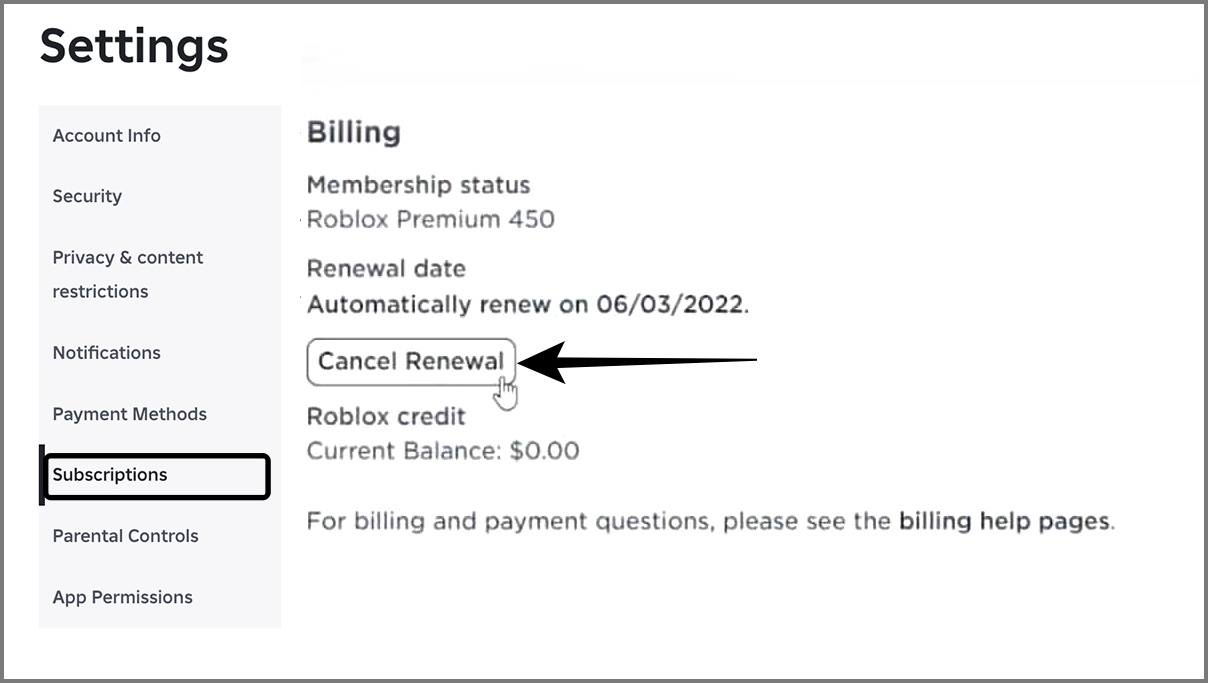


How To Cancel Roblox Premium On Any Device IGeeksBlog Cancel Roblox Premium 1 . How To Cancel Robux On Roblox Step By Step YouTube . How To Cancel Roblox Premium Easy Guide 2026 Stop . How To Cancel Roblox Premium On Mobile YouTube . How To Cancel Roblox Premium Full Guide YouTube


How To Cancel My Roblox Premium Step By Step YouTube . How To Cancel Roblox Premium In 2025 Beebom Cancel Premium Option In Roblox Website . How To Cancel Roblox Premium 2025 YouTube . How To Cancel Roblox Private Server 2025 YouTube . How To Cancel Roblox Premium On Any Device IGeeksBlog Cancel Roblox Premium IPhone


How To Find End Roblox YouTube . How To Cancel Roblox Premium 2024 YouTube . How To Cancel Roblox Premium Full Guide YouTube . How To Cancel Roblox Premium On Mobile Through Google Play Store In . How To Cancel In Roblox YouTube Hqdefault



Premium Cancelled And Renews Regardless . Roblox Premium How To Cancel Membership On PC Mobile Roblox Premium Billing . How To Cancel Roblox Premium Full Guide YouTube . How To Cancel Roblox Premium YouTube . How To Cancel Roblox Premium Cancel Roblox Premium


How To Cancel Premium On Roblox YouTube . How To Cancel Roblox Premium Full Guide 2024 YouTube . How To Cancel Roblox Premium YouTube . How To Cancel Roblox Premium 2024 Guide YouTube . How To Cancel Roblox Premium Tutorial YouTube
How To Cancel Roblox Premium On Any Device IGeeksBlog Cancel Roblox Premium Android . How To Cancel Roblox Premium On Any Device IGeeksBlog How To Cancel Roblox Premium . How To Delete Your Roblox Account Permanently In 2026 Full Guide Roblox Delete.webp. Get Roblox Roblox Premium Site NOSXAT Roblox Premium Membership . Roblox Guide On How To Cancel Roblox Premium


Roblox Premium What Is It Prices How To Subscribe And More Image. How To Cancel Roblox Premium Image. Quick And Easy Your Complete Guide On How To Cancel Roblox Premium F91e5df1 A9b3 4612 9475 . How To Delete Roblox Account Permanently 2026 YouTube . How To Cancel Roblox Premium A Step By Step Guide Lawod How To Cancel Roblox Premium Lawod Ss 390x220